Air Canada
C A S E S T U D Y

Roles
UX/UI Design
Interaction Design
UX Research
Design Systems
Team
Design Lead x1
Product Designers x3
Product Managers x2
Developers x10+
Creating a re-imagined digital experience for a leading Canadian airline.
The Opportunity
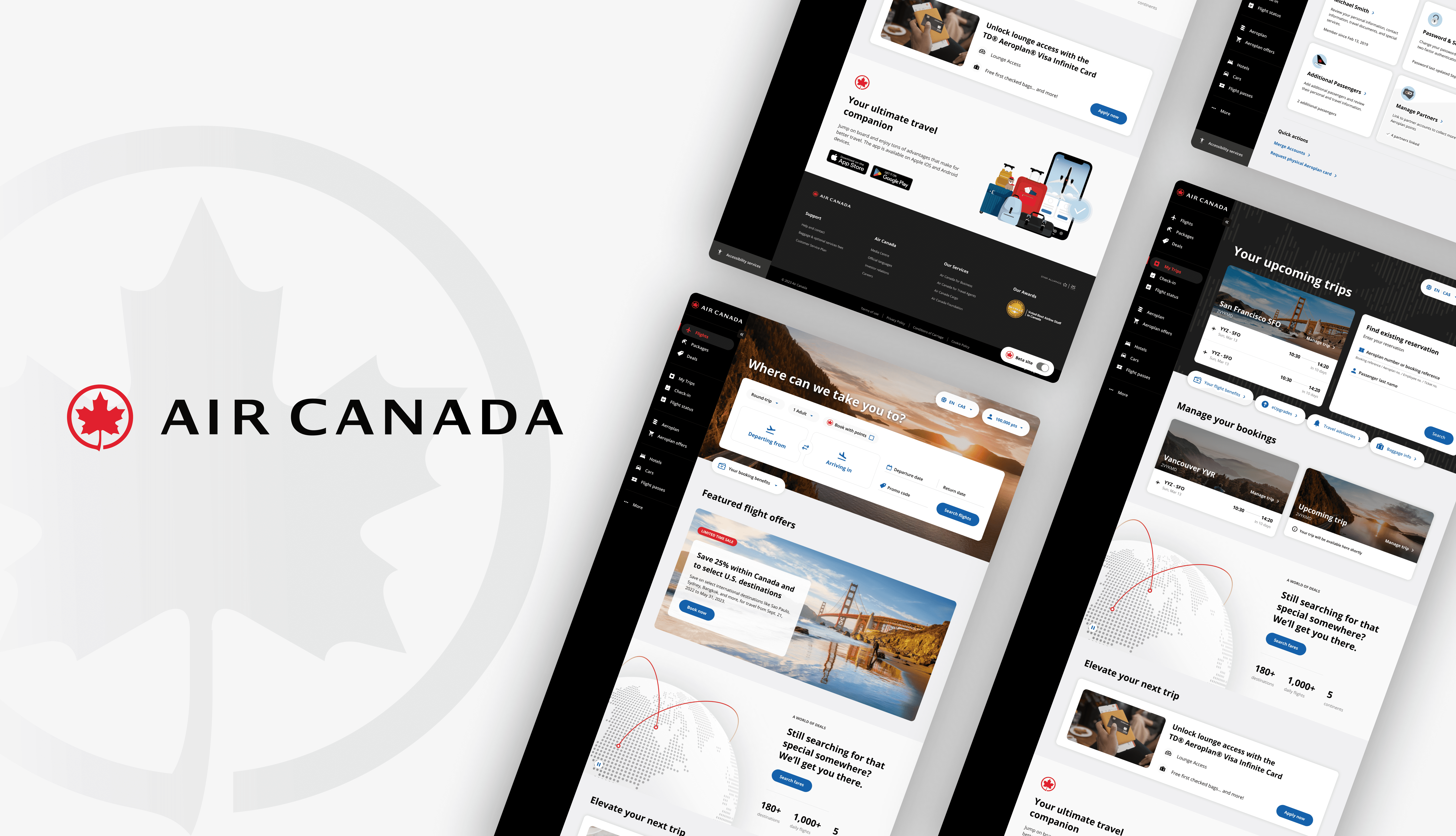
IBM partnered with Air Canada on its transition from its legacy site to a new, reimagined Homepage experience, presenting an opportunity to better showcase the its unique offerings and improve value for passengers across North America.
I led the design of key features like 'Your Booking Benefits' and the booking widget, increasing visibility into product value and enhancing the pre-trip journey. I also established a scalable design system that translated the airline's brand vision into a cohesive, consistent UI framework.
C A S E S T U D Y
Air Canada
Roles
UX/UI Design
Interaction Design
UX Research
Design Systems
Team
Design Lead x 1
Product Designers x 3
Product Managers x 2
Developers x 10+
Creating a re-imagined digital experience for a leading Canadian airline.
The Opportunity
IBM partnered with Air Canada on its transition from its legacy site to a new, reimagined Homepage experience, presenting an opportunity to better showcase the its unique offerings and improve value for passengers across North America.
I led the design of key features like 'Your Booking Benefits' and the booking widget, increasing visibility into product value and enhancing the pre-trip journey. I also established a scalable design system that translated the airline's brand vision into a cohesive, consistent UI framework.
The Outcome
What we achieved

+
%
Improvement in look-to-book ratio

+
%
Purchase value per booking

-
%
Reduction in design & development effort
01 Your Booking Benefits
Reimagining the Benefits Pill
THE CHALLENGE
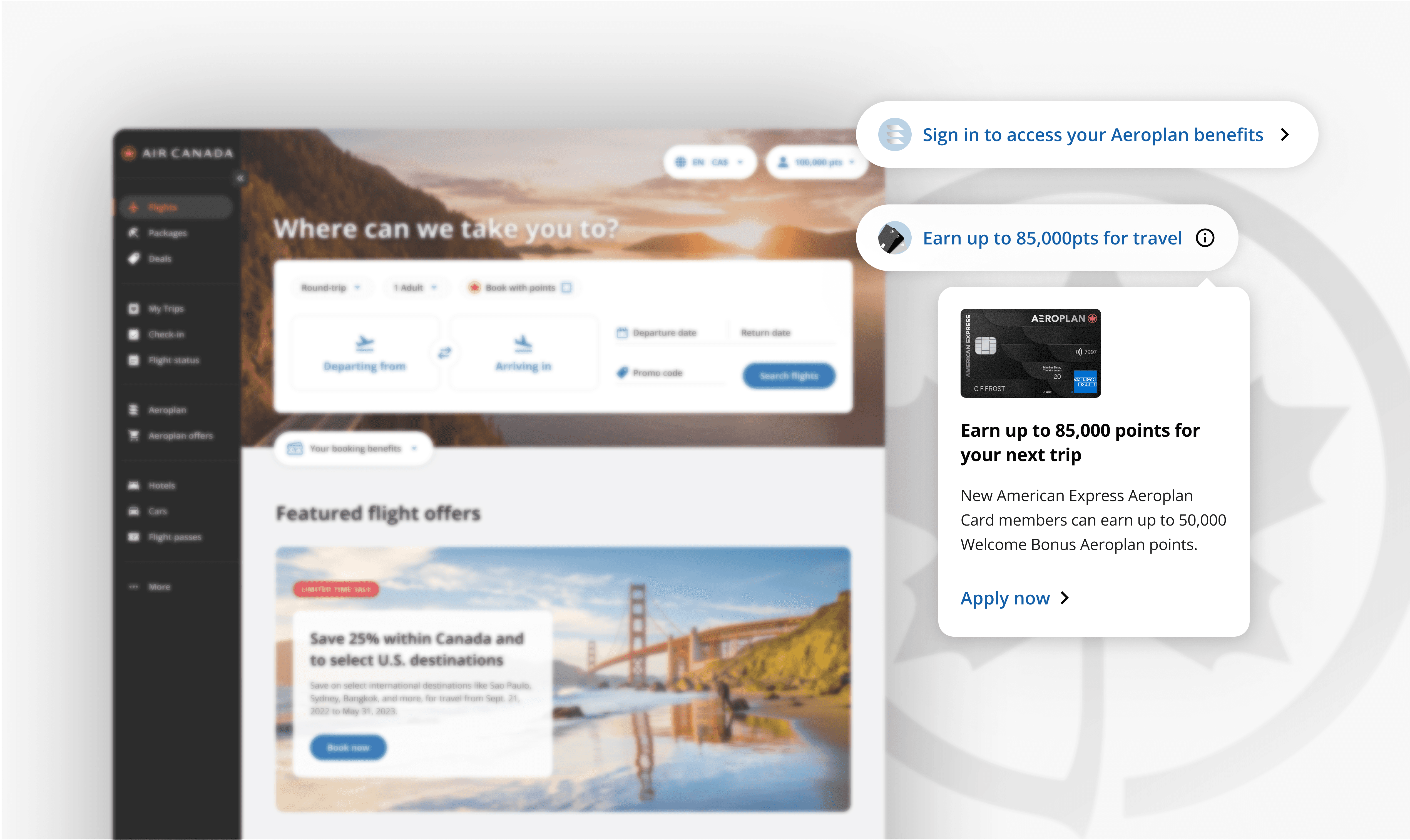
The existing Benefits Pill was easy to overlook - limited to sign-in prompts or credit card promotions, offering little real value in the booking experience.
How might we transform it into a personalized, high-impact touchpoint that surfaces meaningful Aeroplan benefits without adding friction or overwhelming users?
R E S E A R C H
How leading platforms surface complex benefits
I analyzed how top airlines, mobility, and financial platforms surface benefits at decision-making moments to uncover what drives action and where value can be better communicated in the booking flow.

Key Insights
Benefits are surfaced at moments of decision - not buried in account pages, validating a progressive disclosure approach that keeps the experience lightweight while allowing for discovery and depth when needed.
E X P L O R A T I O N
Structuring benefits for clarity and scale
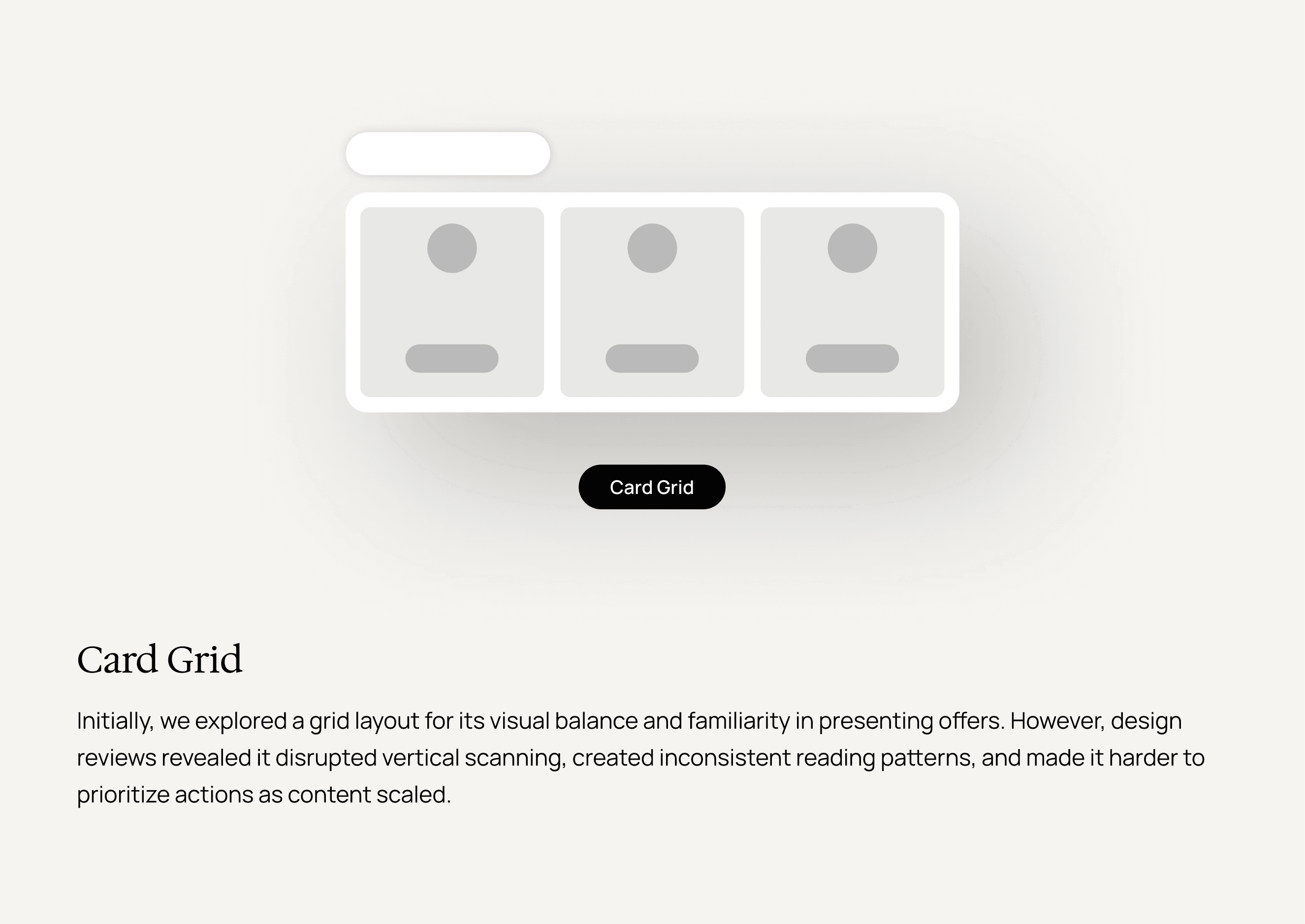
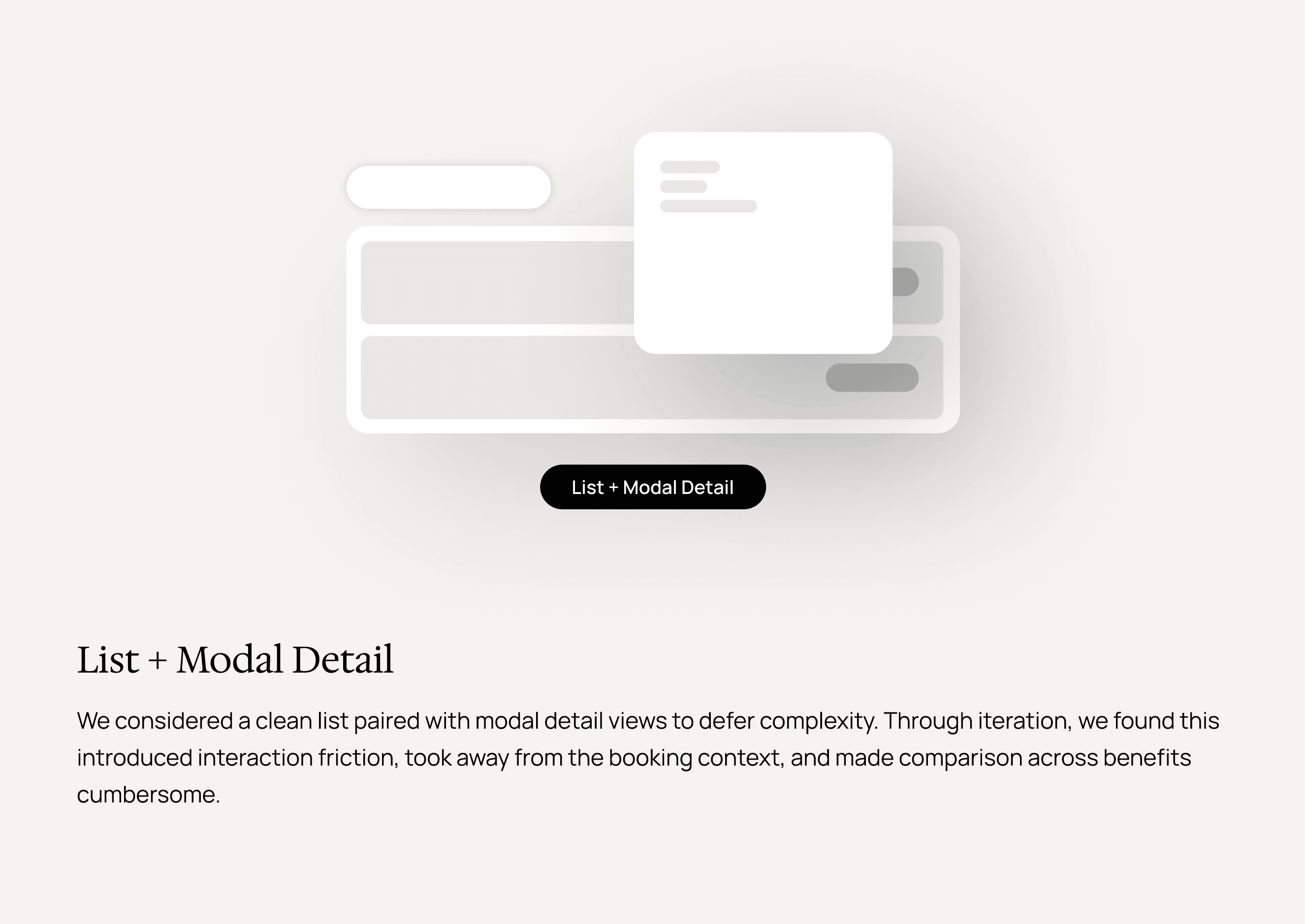
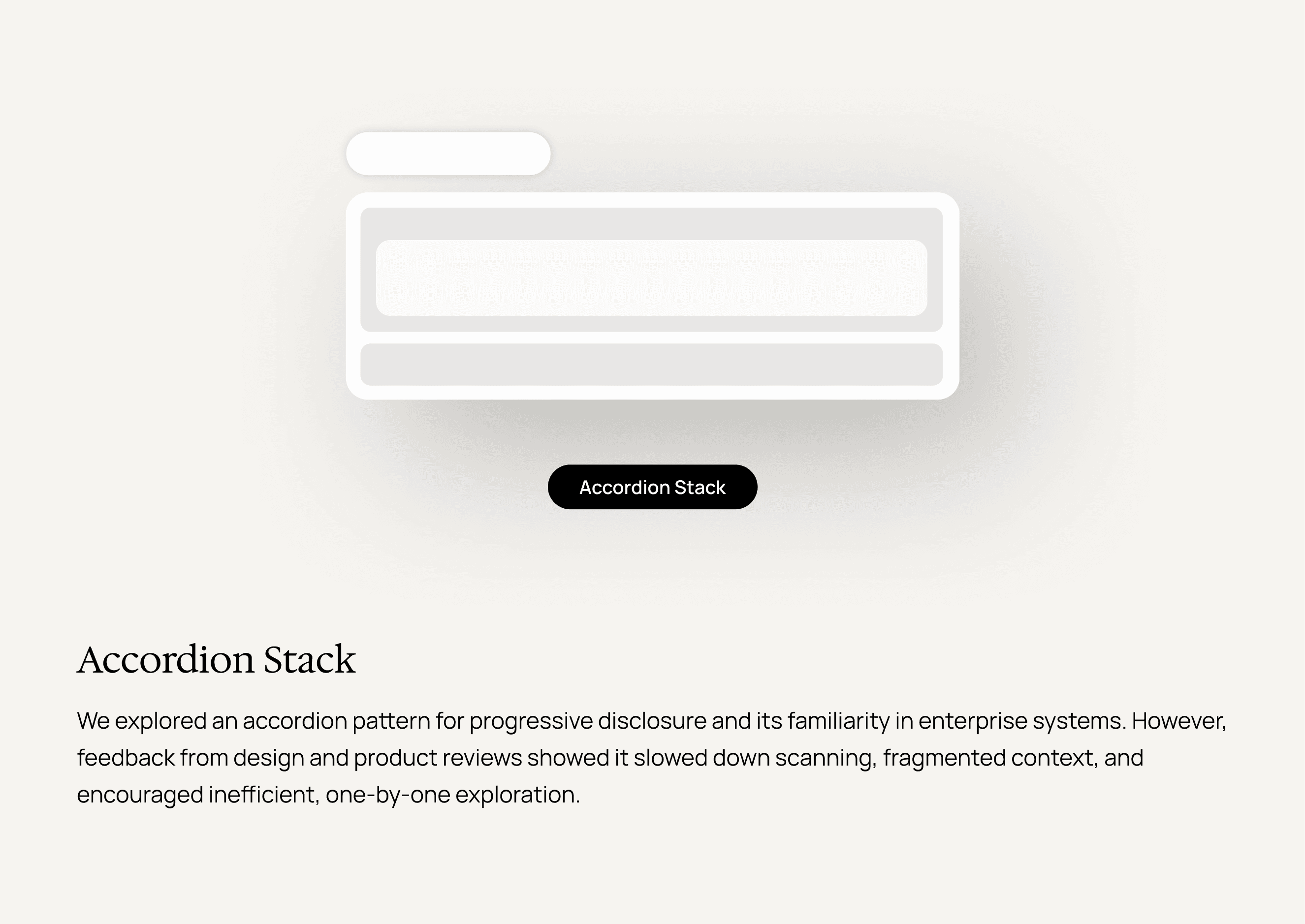
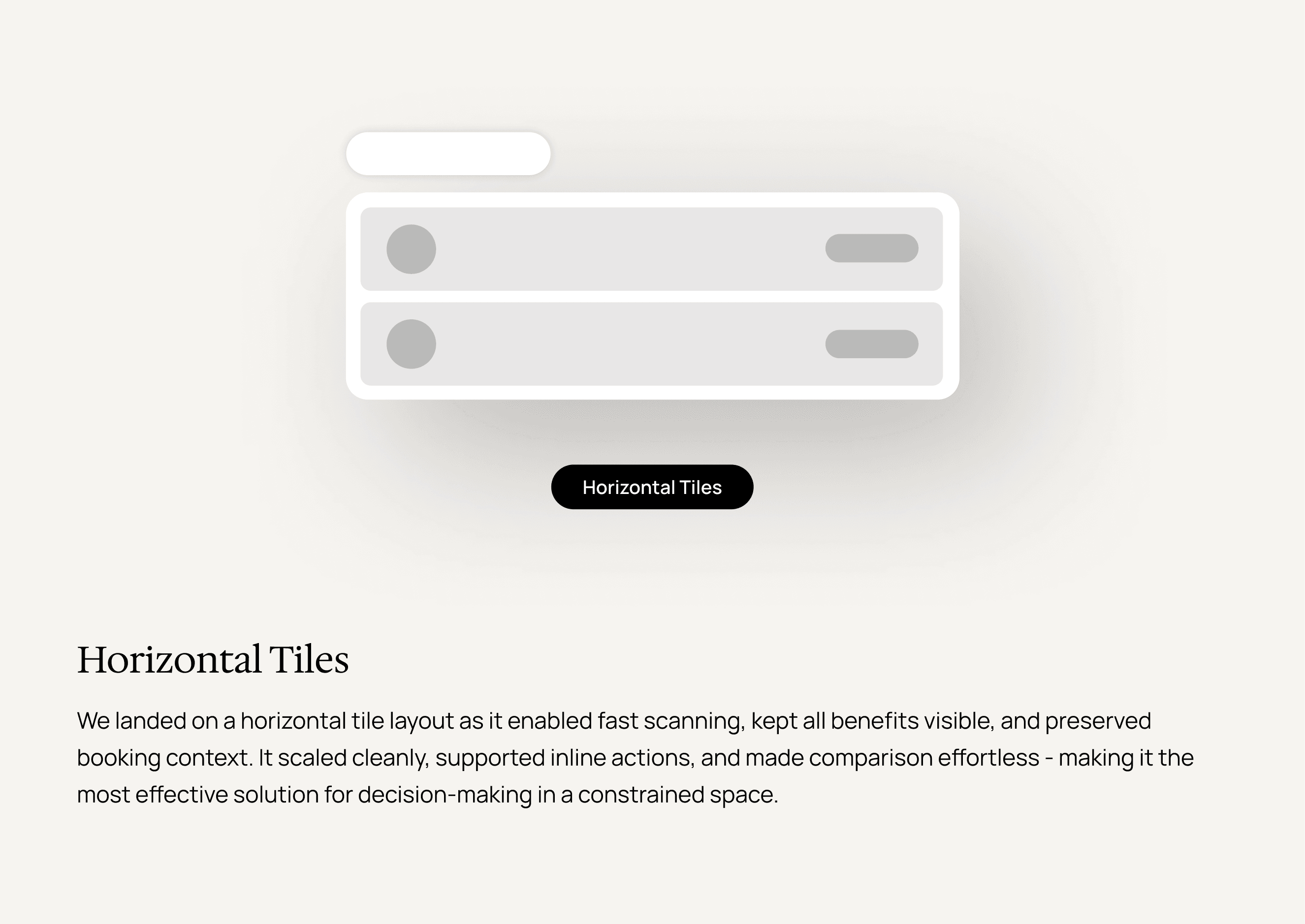
With the interaction model defined, I explored how to most effectively organize and present benefits within the expanded pill - balancing scannability with the need to support growing complexity.
Through rapid iterations and reviews with design and product partners, I tested different layouts, hierarchies, and visual treatments to find a structure that could clearly communicate multiple benefit types without overwhelming the user.
INFORMATION HIERARCHY
Designing for fast, informed decisions.
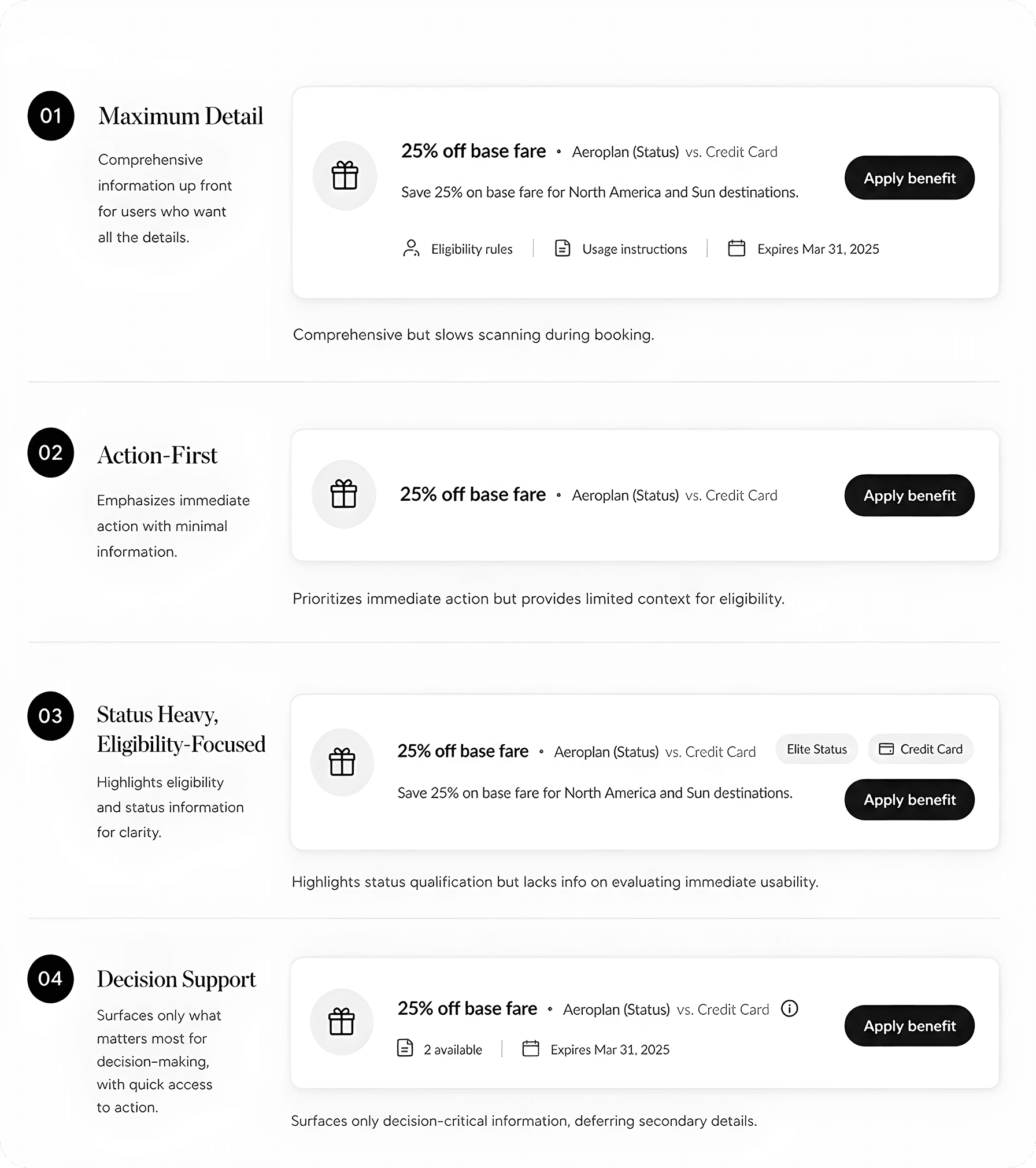
I also explored a series of patterns for how information should be prioritized within the pill.
The final information set prioritized only what matters most - benefit name, source, availability, expiry, and a clear next action - this allowed users to quickly assess value at a glance. Additional details were layered through progressive disclosure, keeping the experience focused without sacrificing depth.
I T E R A T I O N S
Refining through cross-functional feedback
Through ongoing reviews with director-level stakeholders across Product, Design, Brand, and Marketing, I worked on refining the experience - using feedback to align priorities, resolve trade-offs, and move the design toward an intuitive, scalable solution.

FINAL DESIGN
Simplifying complexity into clear decisions.
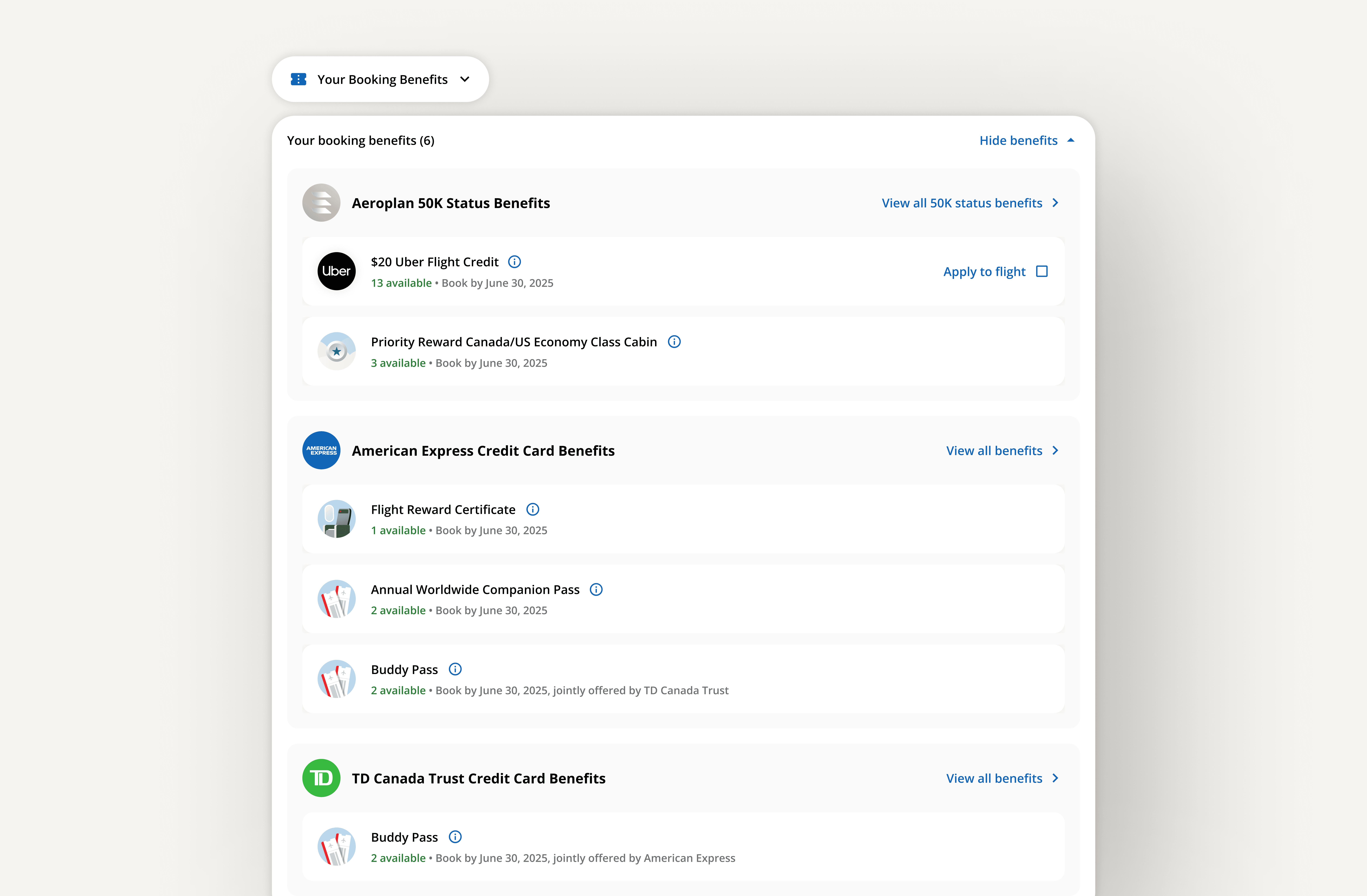
The final design organizes benefits by type and issuing partner, creating a clear hierarchy that makes complex information easy to scan. Grouping by financial institution reduces redundancy while improving recognition and structure.
Time-sensitive details like 'Book by' dates are surfaced upfront, helping users quickly understand eligibility and act with confidence during booking.

02 Economy Fare Upsell
Designing for better fare decisions
THE CHALLENGE
The existing fare upsell experience made comparison difficult - dense text and a lack of clear value framing on premium fares have made upsell feel unconvincing rather than compelling.
How might we redesign fare upsell cards to clearly communicate value differentials and make higher-tier fare options more intuitive and appealing to choose?
R E S E A R C H
How fare value is framed at the moment of choice
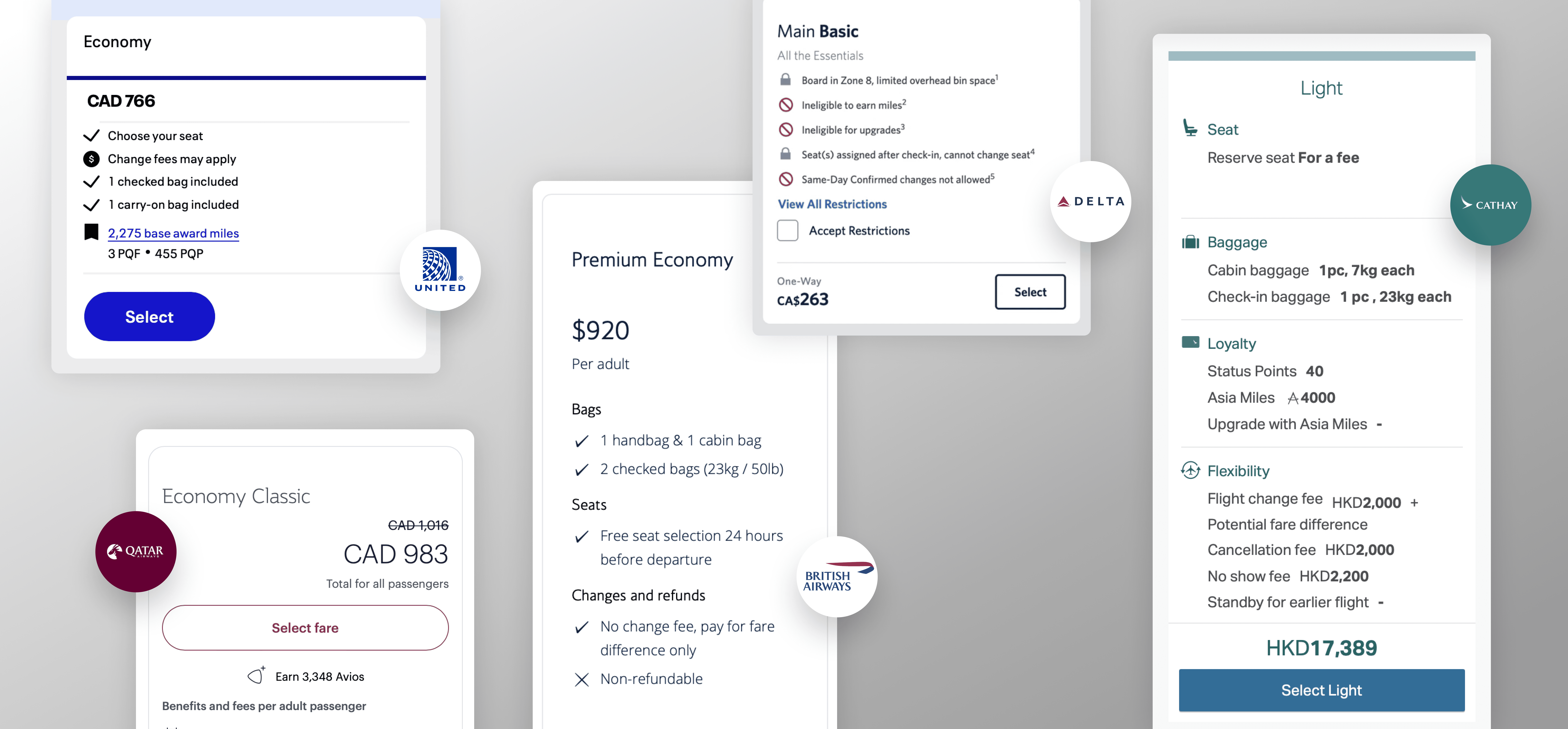
I analyzed how leading airlines present fare options during flight selection, focusing on how price and benefits are prioritized to influence decision-making.
Across platforms, two dominant patterns emerged: some experiences prioritize price as the main focal point, enabling fast, scan-friendly comparisons, while others lead with fare attributes, surfacing benefits upfront to communicate value beyond cost.
Key Insights
Price-first layouts allow for speed and clarity, but can reduce fares to a simple cost comparison, making premium options harder to justify.
Benefit-led approaches better communicate value, but can slow comparison. The opportunity lies in balancing both: anchoring users with price while clearly surfacing differentiating benefits to drive more informed, higher-value decisions.
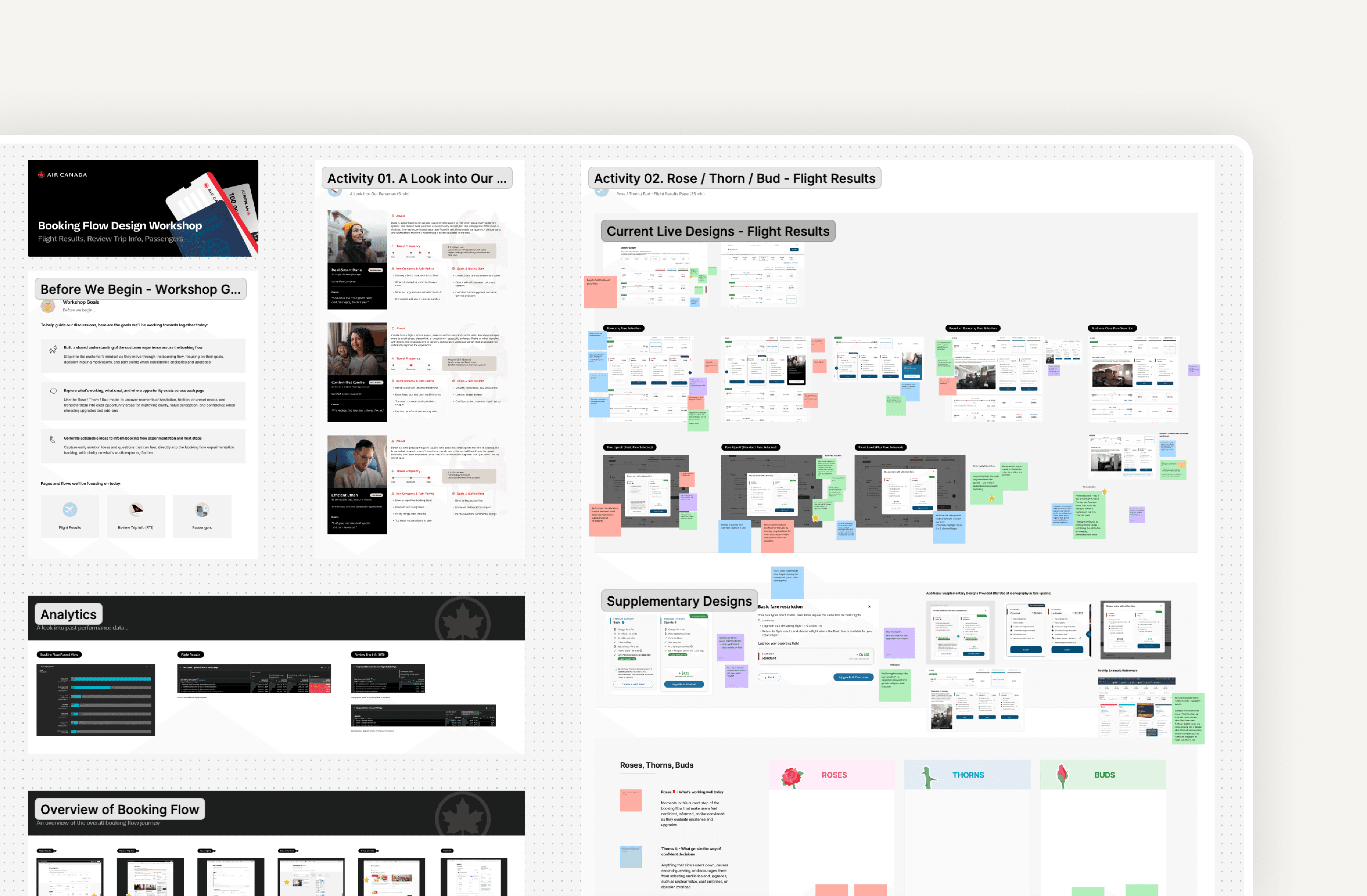
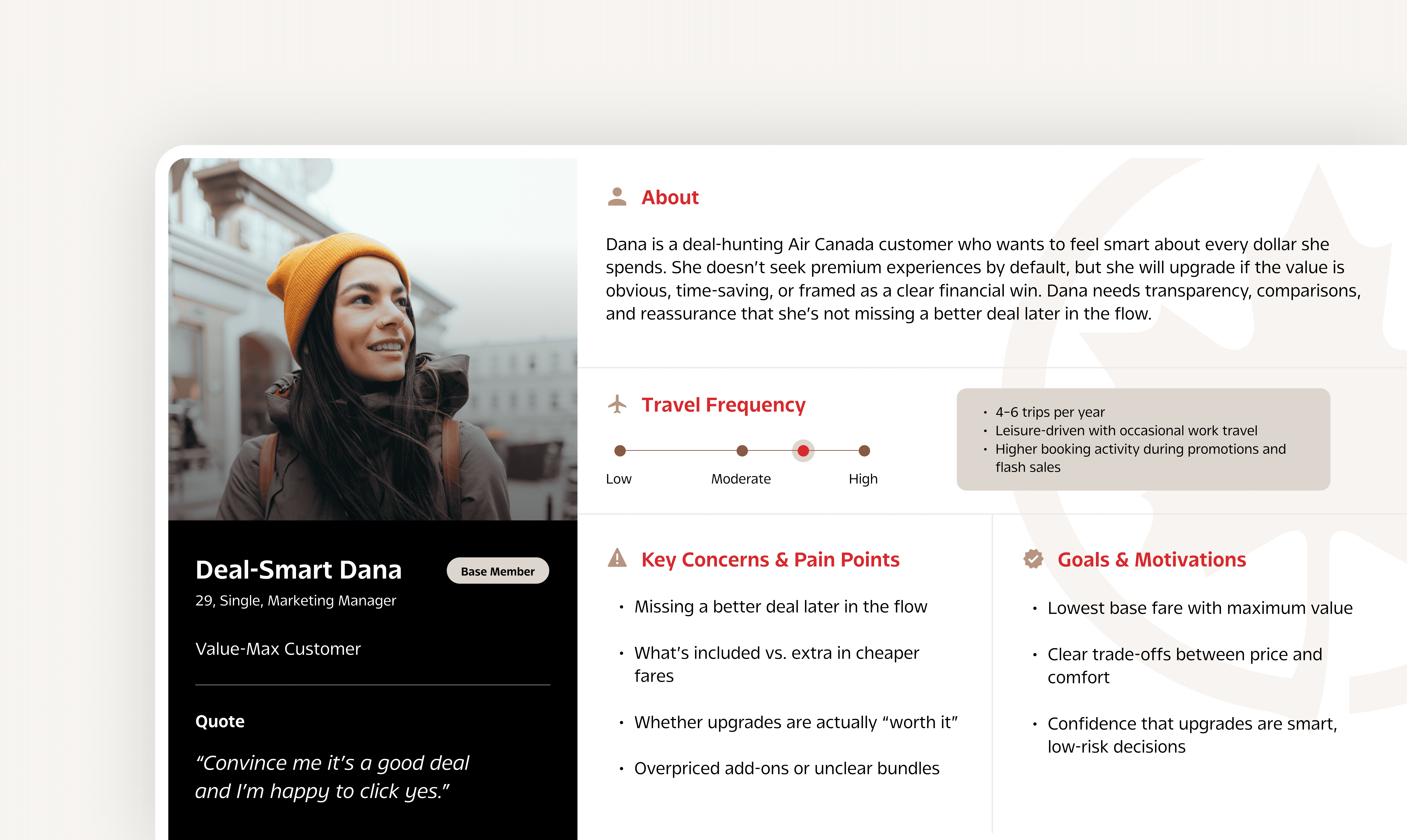
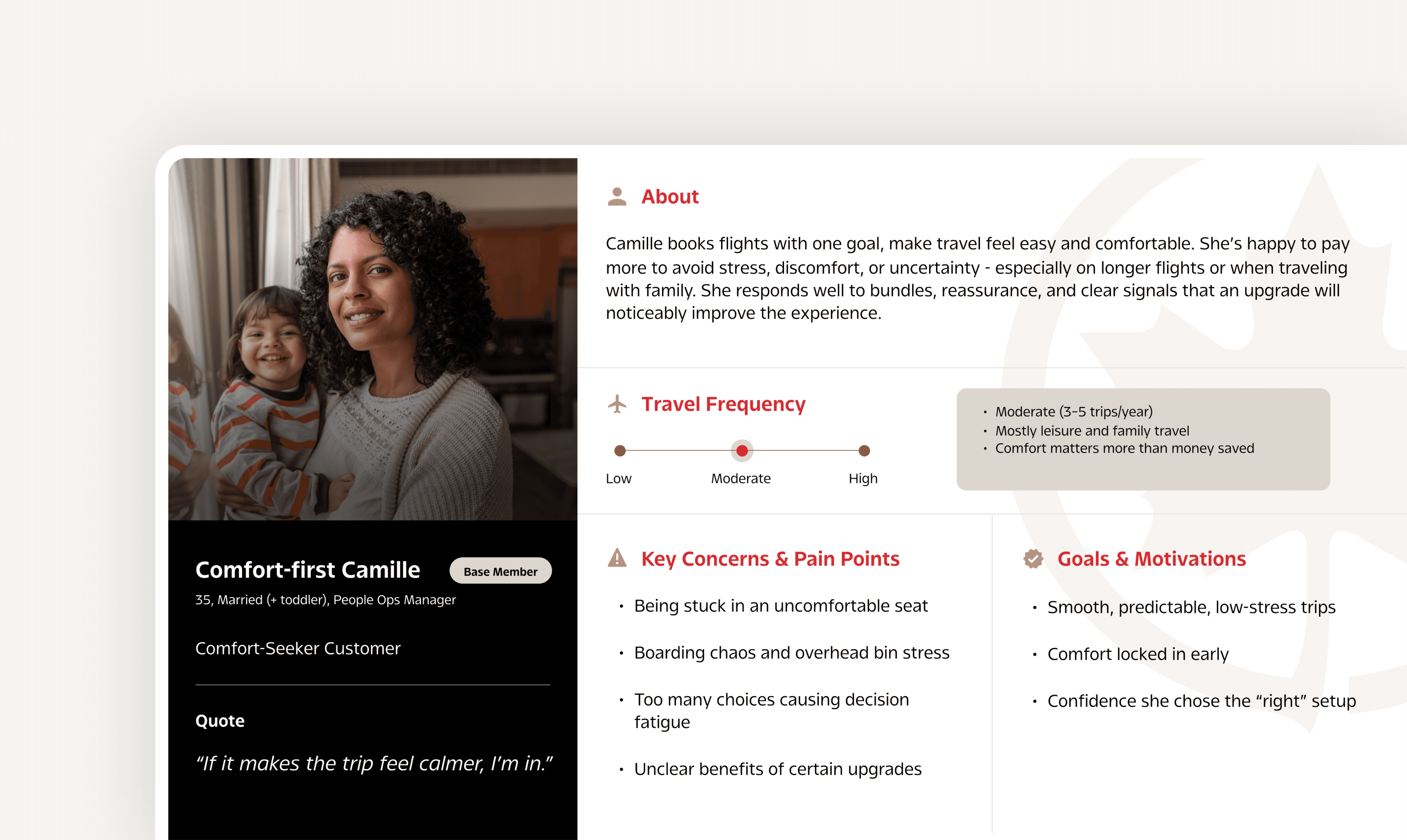
Based on both competitor analysis, creation of proto-personas, and insights from co-creation workshops held with Air Canada's booking flow PMs, I identified 3 core pillars to guide the direction of our design explorations.

PILLAR 01
Highlighting Value Differentials
Focus each fare on what’s incrementally different from the previous tier, removing redundant attributes and reinforcing progression through a clear 'Everything in X, plus' structure
PILLAR 02
Leading with Value Messaging
Introduce a concise, value-driven headline for each fare to clearly communicate its core advantage at a glance, helping users quickly grasp why a fare is worth upgrading to
PILLAR 03
Prioritizing Price and Value
Emphasize price and key value signals at the top of each fare card to support fast comparison, while demoting the fare name to a secondary role to maintain focus on decision-critical information
E X P L O R A T I O N
Structuring fare benefits for clarity and scale
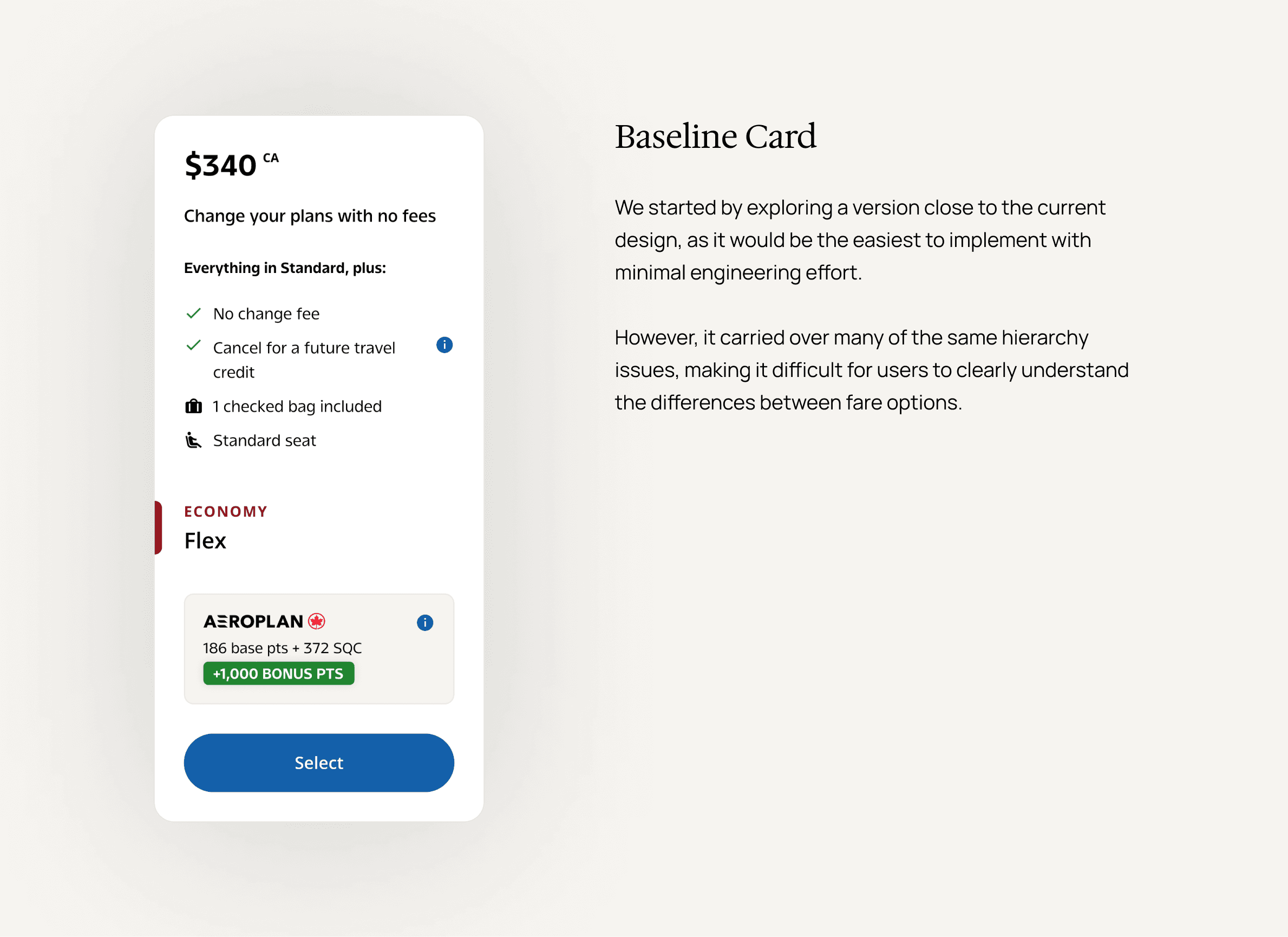
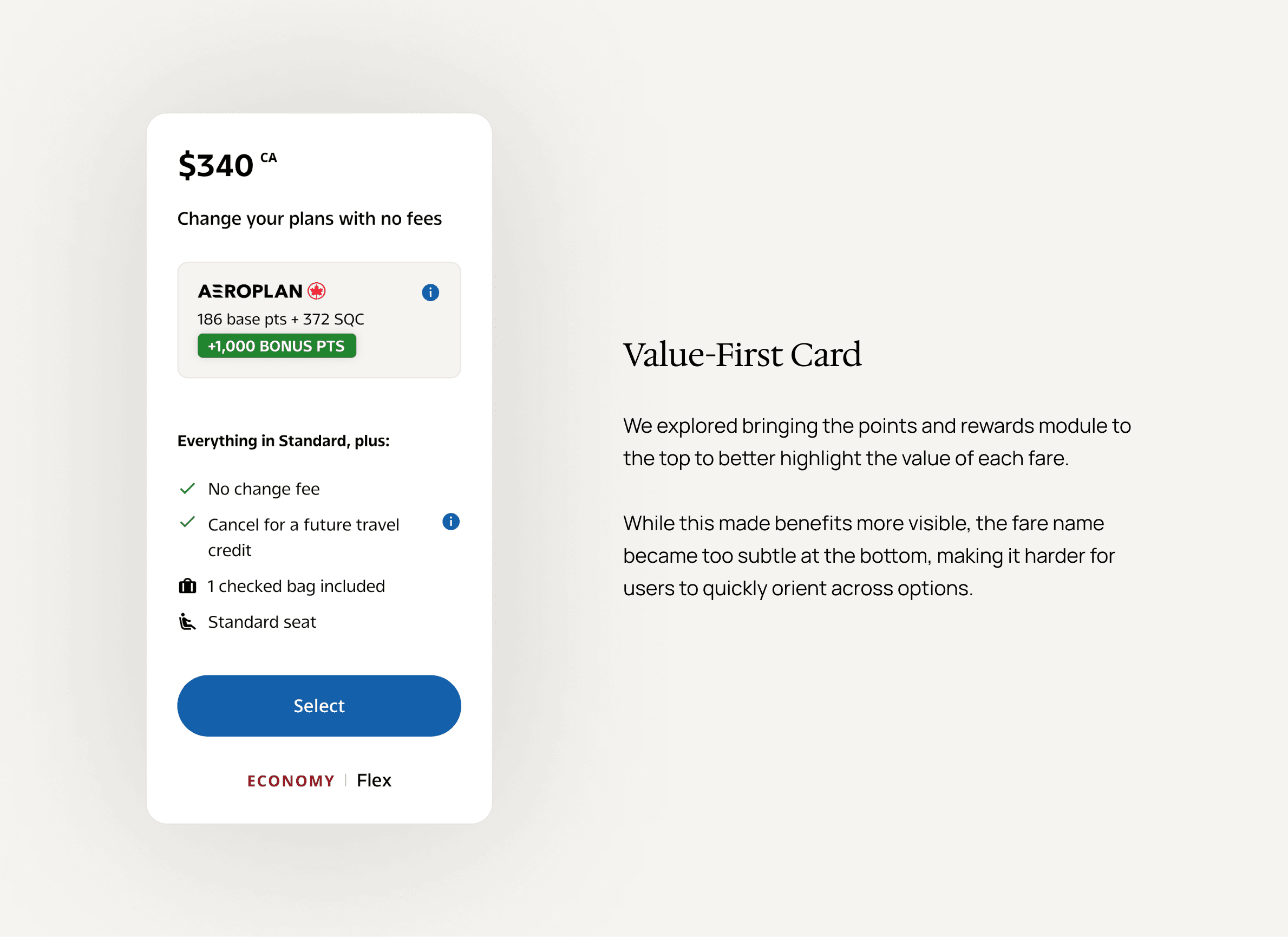
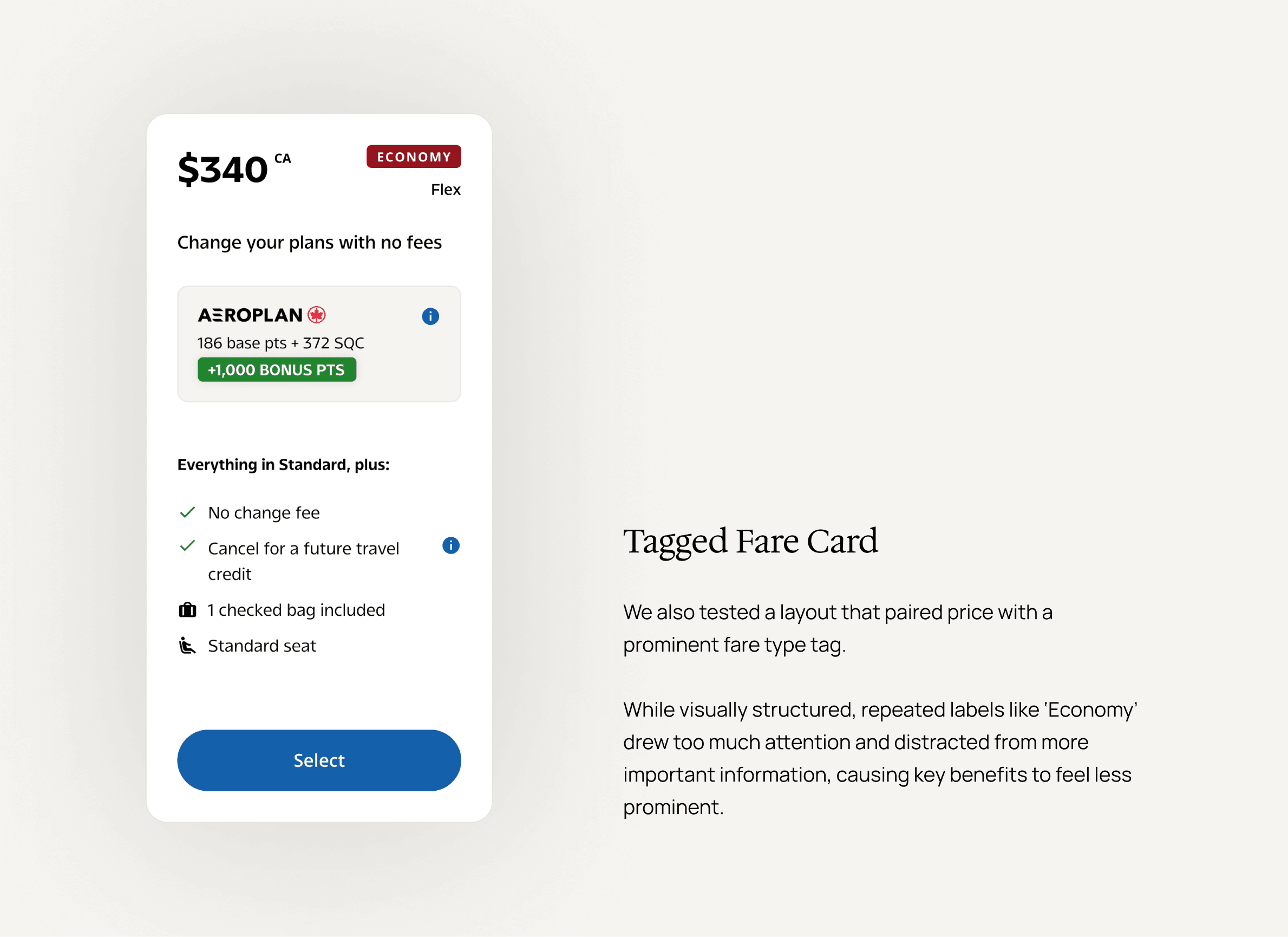
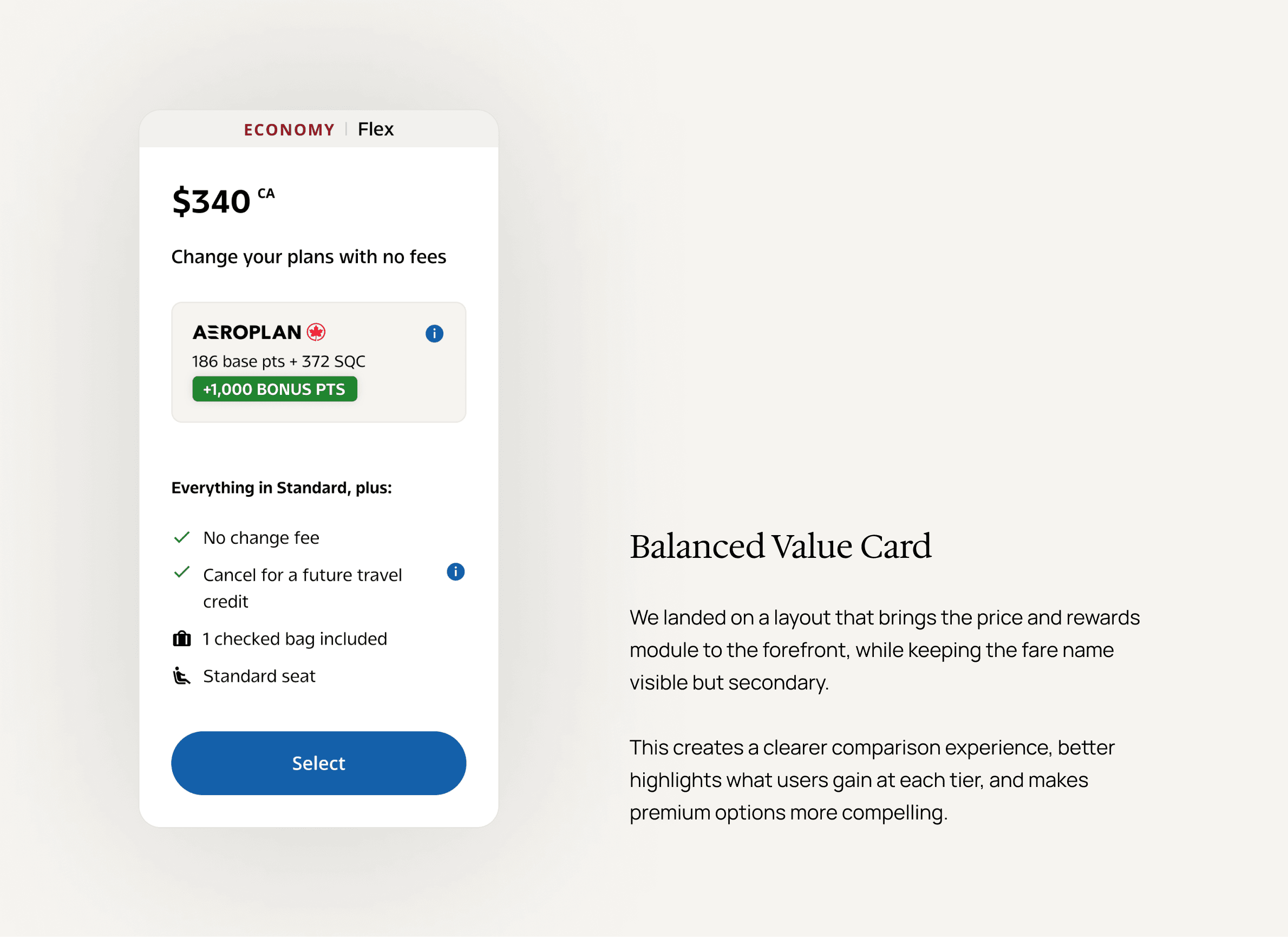
Having defined the core pillars, I explored multiple directions for structuring and presenting fare options - experimenting with different hierarchies, layouts, and value framing approaches to find a solution that makes differences clear, supports fast comparison, and strengthens the overall upsell experience.
KEY TURNING POINT
Advocating for users while balancing business goals.
As we refined the designs, stakeholder discussions surfaced a key concern: placing price at the top made comparison easy, but risked users defaulting to the lowest fare, working against fare upsell goals.
Through iteration, I reframed the hierarchy to balance both needs - bringing benefit-driven value attributes to the top, while moving fare price lower but increasing its visual weight through size and emphasis. This ensured users first understand what they gain, without losing clarity on cost - balancing user decision-making with business objectives.
T H E O U T C O M E S
Driving measurable impact through value-first design
What we validated
A/B testing confirmed that shifting to a value-first fare presentation meaningfully improved both user behaviour and business outcomes.
By emphasizing unique benefits offered by each fare type while maintaining price visibility, the redesigned fare cards increased upgrade intent, improved booking mix, and delivered measurable revenue impact at scale.

03 Influence & Leadership
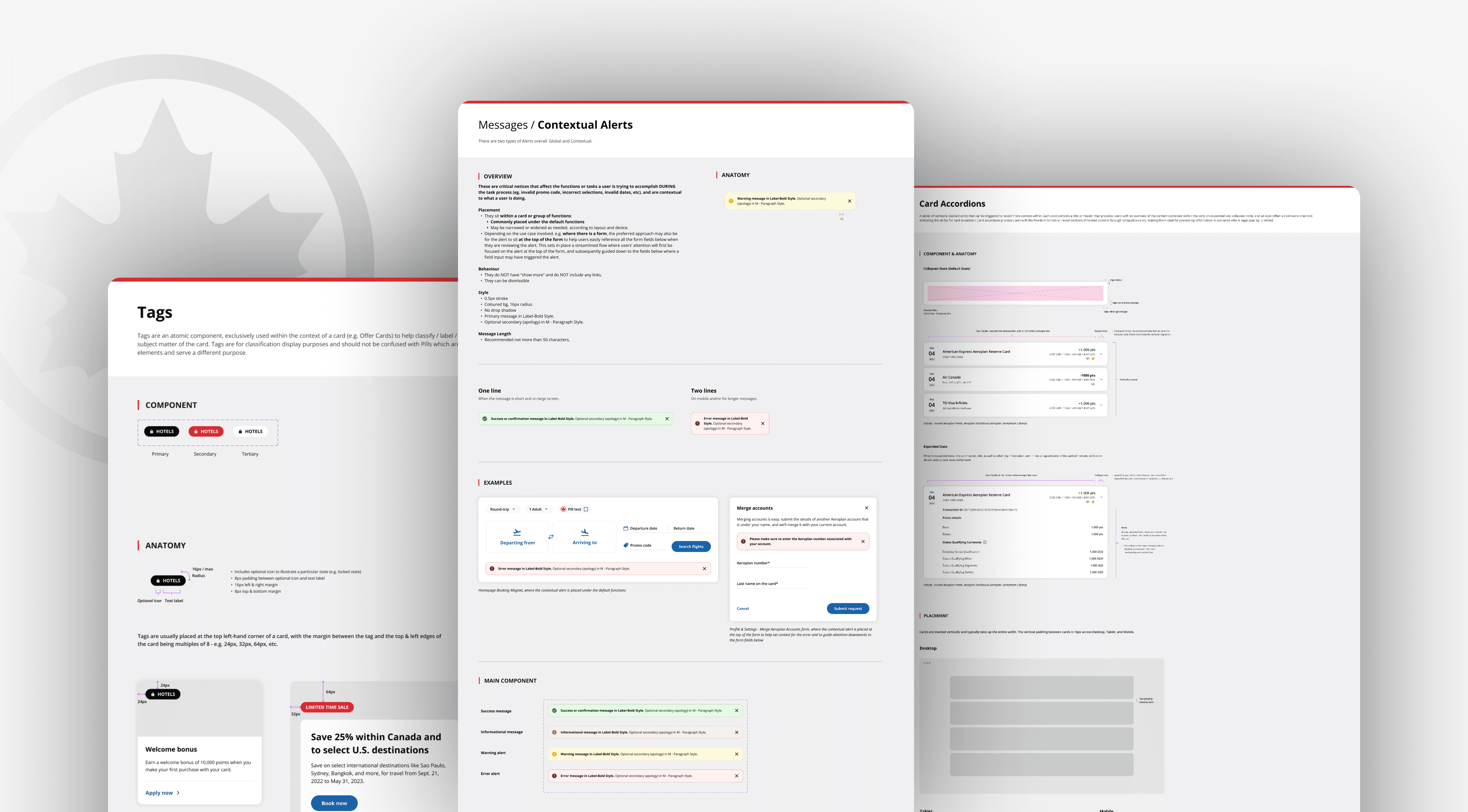
Pioneering the Design System Libraries
LEADERSHIP & INFLUENCE
Leading the foundation for scalable design.
As part of Air Canada’s transition from Sketch to Figma, I contributed to establishing a scalable design system - conducting design audits across existing experiences to standardize components and building reusable patterns.
Recognizing the need for structure beyond core platform components, I initiated and led the Homepage Workstream Library - one of the first of its kind at Air Canada. Built on top of the foundational system, it consolidated frequently used components and set a standard for future workstream libraries, contributing to a ~30% reduction in design and development effort across the Digital Product team.
Driving design directions through research and AI
LEADERSHIP & INFLUENCE
Where research meets AI to drive product decisions.
As the lead designer for Air Canada’s marketing technology platform, I defined the design direction for a system that enables marketers to independently launch campaigns using pre-built templates. I led discovery to reimagine the campaign creation workflow - facilitating stakeholder workshops and conducting user interviews to ground decisions in real-world processes.
I also integrated AI into the design workflow, leveraging tools like Figma Make and Lovable to rapidly prototype and test concepts, accelerating iterations, de-risking design decisions, and driving faster cross-functional alignment.
Air Canada
Roles
UX/UI Design
Interaction Design
UX Research
Design Systems
Team
Design Lead x 1
Product Designers x 3
Product Managers x 2
Developers x 10+
C A S E S T U D Y
Creating a re-imagined digital experience for a leading Canadian airline.
The Opportunity
IBM partnered with Air Canada on its transition from its legacy site to a new, reimagined Homepage experience, presenting an opportunity to better showcase the its unique offerings and improve value for passengers across North America.
I led the design of key features like 'Your Booking Benefits' and the booking widget, increasing visibility into product value and enhancing the pre-trip journey. I also established a scalable design system that translated the airline's brand vision into a cohesive, consistent UI framework.
C A S E S T U D Y
Air Canada
Timeline
11 Months
Roles
UX/UI Design
Interaction Design
UX Research
Design Systems
Team
Design Lead x 1
Product Designers x 3
Product Managers x 2
Developers x 10+
Creating a re-imagined digital experience for a leading Canadian airline.
The Opportunity
IBM partnered with Air Canada on its transition from its legacy site to a new, reimagined Homepage experience, presenting an opportunity to better showcase the its unique offerings and improve value for passengers across North America.
I led the design of key features like 'Your Booking Benefits' and the booking widget, increasing visibility into product value and enhancing the pre-trip journey. I also established a scalable design system that translated the airline's brand vision into a cohesive, consistent UI framework.
The Outcome
What we achieved
+
+
%
%
Improvement in look-to-book ratio
+
+
%
%
Purchase value per booking
-
-
%
%
Reduction in design & development effort
01 Your Booking Benefits
01 Your Booking Benefits
Reimagining the Benefits Pill
THE CHALLENGE
The existing Benefits Pill was easy to overlook - limited to sign-in prompts or credit card promotions, offering little real value in the booking experience.
How might we transform it into a personalized, high-impact touchpoint that surfaces meaningful Aeroplan benefits without adding friction or overwhelming users?
R E S E A R C H
How leading platforms surface complex benefits
I analyzed how top airlines, mobility, and financial platforms surface benefits at decision-making moments to uncover what drives action and where value can be better communicated in the booking flow.
Key Insights
Benefits are surfaced at moments of decision - not buried in account pages, validating a progressive disclosure approach that keeps the experience lightweight while allowing for discovery and depth when needed.
E X P L O R A T I O N
Structuring benefits for clarity and scale
With the interaction model defined, I explored how to most effectively organize and present benefits within the expanded pill - balancing scannability with the need to support growing complexity.
Through rapid iterations and reviews with design and product partners, I tested different layouts, hierarchies, and visual treatments to find a structure that could clearly communicate multiple benefit types without overwhelming the user.
INFORMATION HIERARCHY
Designing for fast, informed decisions.
I also explored a series of patterns for how information should be prioritized within the pill.
The final information set prioritized only what matters most - benefit name, source, availability, expiry, and a clear next action - this allowed users to quickly assess value at a glance. Additional details were layered through progressive disclosure, keeping the experience focused without sacrificing depth.
I T E R A T I O N S
Refining through cross-functional feedback
Through ongoing reviews with director-level stakeholders across Product, Design, Brand, and Marketing, I worked on refining the experience - using feedback to align priorities, resolve trade-offs, and move the design toward an intuitive, scalable solution.
FINAL DESIGN
Simplifying complexity into clear decisions.
The final design organizes benefits by type and issuing partner, creating a clear hierarchy that makes complex information easy to scan. Grouping by financial institution reduces redundancy while improving recognition and structure.
Time-sensitive details like 'Book by' dates are surfaced upfront, helping users quickly understand eligibility and act with confidence during booking.
02 Economy Fare Upsell
Designing for better fare decisions
THE CHALLENGE
The existing fare upsell experience made comparison difficult - dense text and a lack of clear value framing on premium fares have made upsell feel unconvincing rather than compelling.
How might we redesign fare upsell cards to clearly communicate value differentials and make higher-tier fare options more intuitive and appealing to choose?
R E S E A R C H
How fare value is framed at the moment of choice
I analyzed how leading airlines present fare options during flight selection, focusing on how price and benefits are prioritized to influence decision-making.
Across platforms, two dominant patterns emerged: some experiences prioritize price as the main focal point, enabling fast, scan-friendly comparisons, while others lead with fare attributes, surfacing benefits upfront to communicate value beyond cost.
Key Insights
Price-first layouts allow for speed and clarity, but can reduce fares to a simple cost comparison, making premium options harder to justify.
Benefit-led approaches better communicate value, but can slow comparison. The opportunity lies in balancing both: anchoring users with price while clearly surfacing differentiating benefits to drive more informed, higher-value decisions.
Based on both competitor analysis and insights from co-creation workshops held with Air Canada's booking flow PMs, we identified 3 core pillars to guide the direction of our design explorations.
PILLAR 01
Highlighting Value Differentials
Focus each fare on what’s incrementally different from the previous tier, removing redundant attributes and reinforcing progression through a clear 'Everything in X, plus' structure
PILLAR 02
Leading with Value Messaging
Introduce a concise, value-driven headline for each fare to clearly communicate its core advantage at a glance, helping users quickly grasp why a fare is worth upgrading to
PILLAR 03
Prioritizing Price and Value
Emphasize price and key value signals at the top of each fare card to support fast comparison, while demoting the fare name to a secondary role to maintain focus on decision-critical information
E X P L O R A T I O N
Structuring benefits for clarity and scale
Having defined the core pillars, I explored multiple directions for structuring and presenting fare options - experimenting with different hierarchies, layouts, and value framing approaches to find a solution that makes differences clear, supports fast comparison, and strengthens the overall upsell experience.
KEY TURNING POINT
Advocating for users while balancing business goals.
As we refined the designs, stakeholder discussions surfaced a key concern: placing price at the top made comparison easy, but risked users defaulting to the lowest fare, working against fare upsell goals.
Through iteration, I reframed the hierarchy to balance both needs - bringing benefit-driven value attributes to the top, while moving fare price lower but increasing its visual weight through size and emphasis. This ensured users first understand what they gain, without losing clarity on cost - balancing user decision-making with business objectives.
T H E O U T C O M E S
Driving measurable impact through value-first design
What we validated
A/B testing confirmed that shifting to a value-first fare presentation meaningfully improved both user behaviour and business outcomes.
By emphasizing unique benefits offered by each fare type while maintaining price visibility, the redesigned fare cards increased upgrade intent, improved booking mix, and delivered measurable revenue impact at scale.
03 Influence & Leadership
Pioneering the Design System Libraries
LEADERSHIP & INFLUENCE
Leading the foundation for scalable design.
As part of Air Canada’s transition from Sketch to Figma, I contributed to establishing a scalable design system - conducting design audits across existing experiences to standardize components and building reusable patterns.
Recognizing the need for structure beyond core platform components, I initiated and led the Homepage Workstream Library - one of the first of its kind at Air Canada. Built on top of the foundational system, it consolidated frequently used components and set a standard for future workstream libraries, contributing to a ~30% reduction in design and development effort across the Digital Product team.
Driving design directions through research and AI
LEADERSHIP & INFLUENCE
Driving product direction through research and AI.
As the lead designer for Air Canada’s marketing technology platform, I defined the design direction for a system that enables marketers to independently launch campaigns using pre-built templates. I led discovery to reimagine the campaign creation workflow - facilitating stakeholder workshops and conducting user interviews to ground decisions in real-world processes.
I also integrated AI into the design workflow, leveraging tools like Figma Make and Lovable to rapidly prototype and test concepts, accelerating iterations, de-risking design decisions, and driving faster cross-functional alignment.
C A S E S T U D Y
Air Canada
Timeline
11 Months
Roles
UX/UI Design
Interaction Design
UX Research
Design Systems
Team
Design Lead x 1
Product Designers x 3
Product Managers x 2
Developers x 10+
Creating a re-imagined digital experience for a leading Canadian airline.
The Opportunity
IBM partnered with Air Canada on its transition from its legacy site to a new, reimagined Homepage experience, presenting an opportunity to better showcase the its unique offerings and improve value for passengers across North America.
I led the design of key features like 'Your Booking Benefits' and the booking widget, increasing visibility into product value and enhancing the pre-trip journey. I also established a scalable design system that translated the airline's brand vision into a cohesive, consistent UI framework.
The Outcome
What we achieved
+
+
%
%
Improvement in look-to-book ratio
+
+
%
%
Purchase value per booking
-
-
%
%
Reduction in design & development effort
01 Your Booking Benefits
01 Your Booking Benefits
Reimagining the Benefits Pill
THE CHALLENGE
The existing Benefits Pill was easy to overlook - limited to sign-in prompts or credit card promotions, offering little real value in the booking experience.
How might we transform it into a personalized, high-impact touchpoint that surfaces meaningful Aeroplan benefits without adding friction or overwhelming users?
R E S E A R C H
How leading platforms surface complex benefits
I analyzed how top airlines, mobility, and financial platforms surface benefits at decision-making moments to uncover what drives action and where value can be better communicated in the booking flow.
Key Insights
Benefits are surfaced at moments of decision - not buried in account pages, validating a progressive disclosure approach that keeps the experience lightweight while allowing for discovery and depth when needed.
E X P L O R A T I O N
Structuring benefits for clarity and scale
With the interaction model defined, I explored how to most effectively organize and present benefits within the expanded pill - balancing scannability with the need to support growing complexity.
Through rapid iterations and reviews with design and product partners, I tested different layouts, hierarchies, and visual treatments to find a structure that could clearly communicate multiple benefit types without overwhelming the user.
INFORMATION HIERARCHY
Designing for fast, informed decisions.
I also explored a series of patterns for how information should be prioritized within the pill.
The final information set prioritized only what matters most - benefit name, source, availability, expiry, and a clear next action - this allowed users to quickly assess value at a glance. Additional details were layered through progressive disclosure, keeping the experience focused without sacrificing depth.
I T E R A T I O N S
Refining through cross-functional feedback
Through ongoing reviews with director-level stakeholders across Product, Design, Brand, and Marketing, I worked on refining the experience - using feedback to align priorities, resolve trade-offs, and move the design toward an intuitive, scalable solution.
FINAL DESIGN
Simplifying complexity into clear decisions.
The final design organizes benefits by type and issuing partner, creating a clear hierarchy that makes complex information easy to scan. Grouping by financial institution reduces redundancy while improving recognition and structure.
Time-sensitive details like 'Book by' dates are surfaced upfront, helping users quickly understand eligibility and act with confidence during booking.
Iteration Journey
Your Booking Benefits
02 Economy Fare Upsell
Designing for better fare decisions
THE CHALLENGE
The existing fare upsell experience made comparison difficult - dense text and a lack of clear value framing on premium fares have made upsell feel unconvincing rather than compelling.
How might we redesign fare upsell cards to clearly communicate value differentials and make higher-tier fare options more intuitive and appealing to choose?
R E S E A R C H
How fare value is framed at the moment of choice
I analyzed how leading airlines present fare options during flight selection, focusing on how price and benefits are prioritized to influence decision-making.
Across platforms, two dominant patterns emerged: some experiences prioritize price as the main focal point, enabling fast, scan-friendly comparisons, while others lead with fare attributes, surfacing benefits upfront to communicate value beyond cost.
Key Insights
Price-first layouts allow for speed and clarity, but can reduce fares to a simple cost comparison, making premium options harder to justify.
Benefit-led approaches better communicate value, but can slow comparison. The opportunity lies in balancing both: anchoring users with price while clearly surfacing differentiating benefits to drive more informed, higher-value decisions.
Based on both competitor analysis and insights from co-creation workshops held with Air Canada's booking flow PMs, we identified 3 core pillars to guide the direction of our design explorations.
PILLAR 01
Highlighting Value Differentials
Focus each fare on what’s incrementally different from the previous tier, removing redundant attributes and reinforcing progression through a clear 'Everything in X, plus' structure
PILLAR 02
Leading with Value Messaging
Introduce a concise, value-driven headline for each fare to clearly communicate its core advantage at a glance, helping users quickly grasp why a fare is worth upgrading to
PILLAR 03
Prioritizing Price and Value
Emphasize price and key value signals at the top of each fare card to support fast comparison, while demoting the fare name to a secondary role to maintain focus on decision-critical information
E X P L O R A T I O N
Structuring benefits for clarity and scale
Having defined the core pillars, I explored multiple directions for structuring and presenting fare options - experimenting with different hierarchies, layouts, and value framing approaches to find a solution that makes differences clear, supports fast comparison, and strengthens the overall upsell experience.
KEY TURNING POINT
Advocating for users while balancing business goals.
As we refined the designs, stakeholder discussions surfaced a key concern: placing price at the top made comparison easy, but risked users defaulting to the lowest fare, working against fare upsell goals.
Through iteration, I reframed the hierarchy to balance both needs - bringing benefit-driven value attributes to the top, while moving fare price lower but increasing its visual weight through size and emphasis. This ensured users first understand what they gain, without losing clarity on cost - balancing user decision-making with business objectives.
T H E O U T C O M E S
Driving measurable impact through value-first design
What we validated
A/B testing confirmed that shifting to a value-first fare presentation meaningfully improved both user behaviour and business outcomes.
By emphasizing unique benefits offered by each fare type while maintaining price visibility, the redesigned fare cards increased upgrade intent, improved booking mix, and delivered measurable revenue impact at scale.
03 Influence & Leadership
Pioneering the Design System Libraries
LEADERSHIP & INFLUENCE
Leading the foundation for scalable design.
As part of Air Canada’s transition from Sketch to Figma, I contributed to establishing a scalable design system - conducting design audits across existing experiences to standardize components and building reusable patterns.
Recognizing the need for structure beyond core platform components, I initiated and led the Homepage Workstream Library - one of the first of its kind at Air Canada. Built on top of the foundational system, it consolidated frequently used components and set a standard for future workstream libraries, contributing to a ~30% reduction in design and development effort across the Digital Product team.
Driving design directions through research and AI
LEADERSHIP & INFLUENCE
Driving product direction through research and AI.
As the lead designer for Air Canada’s marketing technology platform, I defined the design direction for a system that enables marketers to independently launch campaigns using pre-built templates. I led discovery to reimagine the campaign creation workflow - facilitating stakeholder workshops and conducting user interviews to ground decisions in real-world processes.
I also integrated AI into the design workflow, leveraging tools like Figma Make and Lovable to rapidly prototype and test concepts, accelerating iterations, de-risking design decisions, and driving faster cross-functional alignment.
Password Required
Please enter the site password to view this case study